Monday, October 11, 2010

What is GoogleME???

This is a question thats doing the rounds on the Internet basically to answer that question GoogleMe is a rumored social networking website from Google that is apparently not far away from launching and is Google’s attempt to take on rival Social networking powerhouse Facebook.

Google is doing plenty to give signs of a forthcoming social connecting utility with their recent spending activity buying Slide and Jambool the company behind virtual currency Social Gold all these are indications of Google’s eagerness to rule the social market as thats where they can do the most of their business. A great number of people just think that Google is just a search engine they forget that they are the powerhouse of advertising making up a huge percentage of total advertising on the entire Internet. Google also owns many other websites such as YouTube to name a few, watch this space as GoogleMe is looking and once it’s here we will bring you up to date news and features on Google’s new social networking website.

Wednesday, October 6, 2010

GOOGLE INSTANT


Google Instant is a new search enhancement that shows results as you type. We are pushing the limits of our technology and infrastructure to help you get better search results, faster. Our key technical insight was that people type slowly, but read quickly, typically taking 300 milliseconds between keystrokes, but only 30 milliseconds (a tenth of the time!) to glance at another part of the page. This means that you can scan a results page while you type.

The most obvious change is that you get to the right content much faster than before because you don’t have to finish typing your full search term, or even press “search.” Another shift is that seeing results as you type helps you formulate a better search term by providing instant feedback. You can now adapt your search on the fly until the results match exactly what you want. In time, we may wonder how search ever worked in any other way.

Benefits

Faster Searches: By predicting your search and showing results before you finish typing, Google Instant can save 2-5 seconds per search.

Smarter Predictions: Even when you don’t know exactly what you’re looking for, predictions help guide your search. The top prediction is shown in grey text directly in the search box, so you can stop typing as soon as you see what you need.

Instant Results: Start typing and results appear right before your eyes. Until now, you had to type a full search term, hit return, and hope for the right results. Now results appear instantly as you type, helping you see where you’re headed, every step of the way.

Did you know:

  • Before Google Instant, the typical searcher took more than 9 seconds to enter a search term, and we saw many examples of searches that took 30-90 seconds to type.
  • Using Google Instant can save 2-5 seconds per search.
  • If everyone uses Google Instant globally, we estimate this will save more than 3.5 billion seconds a day. That’s 11 hours saved every second.
  • 15 new technologies contribute to Google Instant functionality.

Wednesday, July 14, 2010

What is Microsoft Surface?


2
Microsoft Surface is a revolutionary multi-touch computer that responds to natural hand gestures and real-world objects, helping people interact with digital content in a simple and intuitive way. With a large, horizontal user interface, Surface offers a unique gathering place where multiple users can collaboratively and simultaneously interact with data and each other.
Beyond the traditional mouse-and- keyboard
experience.

First commercially available surface computer from
Microsoft Corp.,

Changes an ordinary tabletop into a vibrant,
interactive surface.

The product idea for Surface was initially
conceptualized in 2001 by Steven Bathiche of Microsoft Hardware and Andy Wilson of Microsoft Research.

Surface was unveiled by Microsoft Chief Executive Officer Steve Ballmer on May 30,2007 at the wall Street Journal's in California.
Key features of Microsoft Surface

MultiTouch
Direct Interaction
Multi-user
Object Recognition
Surface computing is a new way of working with computers that moves beyond the traditional mouse-and-keyboard experience. It is a natural user interface that allows people to interact with digital content the same way they have interactedwith everyday items such as photos, paintbrushes and music their entire life: with their hands, with gestures and by putting real- world objects on the surface

Surface breaks down the traditional barriers between people and technology, providing effortless interaction with digital content

Wednesday, December 23, 2009

Top 10 Benefits of Office 2010 Beta


Top 10 Benefits of
Office 2010 Beta

Microsoft Office 2010 Beta

Microsoft® Office 2010 offers rich and powerful new ways to deliver your best work at the office, home, or school. Grab your audience’s attention and inspire them with your ideas visually. Create results with people at the same time and stay connected to your files across the town or around the world.1 With Office 2010, you’re in control of getting things done and delivering amazing results according to your schedule.

1

Express your ideas more visually

Office 2010 opens up a world of design options to help you give life to your ideas. The new and improved picture formatting tools such as color saturation and artistic effects let you transform your document visuals into a work of art. Combined with a wide range of new pre-built Office themes and SmartArt® graphic layouts, Office 2010 gives you more ways to make your ideas stick.

2

Accomplish more when working together

Brainstorm ideas, provide better version control, and meet deadlines faster when you work in groups. The co-authoring experience for Microsoft® Word 2010, Microsoft PowerPoint 2010, Microsoft® Excel Web App and Microsoft OneNote shared notebooks let you work on a file with several people at once - even from different locations.2

3

Enjoy the familiar Office experience from more locations and more devices

With Office 2010, you can get things done more easily, from more locations and more devices. Using a smartphone or virtually any computer with an Internet connection, you can work when and where you want to work.3


4

Create powerful data insights and visuals

Track and highlight important trends with new data analysis and visualization features in Excel 2010. The new Sparklines feature delivers a clear and compact visual representation of your data with small charts within worksheet cells. Filter and segment your PivotTable data in multiple layers using Slicers to spend more time analyzing and less time formatting.

5

Deliver compelling presentations

Captivate your audience with personalized videos in your presentation. Insert and customize videos directly in PowerPoint 2010—trim, add fades and effects, or bookmark key points in the video to call attention to selected scenes. Videos you insert are now embedded by default, relieving you from managing and sending additional video files.

6

Manage large volumes of e-mail with ease

Compress your long e-mail threads into a few conversations that can be categorized, filed, ignored, or cleaned up. The new Quick Steps feature let you perform multi-command tasks, such as reply and delete an e-mail in a single click, saving you time and in-box space.

7

Store and track all your ideas and notes in one place

Get the ultimate digital notebook for tracking, organizing, and sharing your text, picture, video and audio notes with OneNote 2010. New features such as version tracking, automatic highlighting, and Linked Notes give you more control over your notes so you’re always on top of where your ideas came from and the latest changes when working in teams.4

8

Get your message out instantly

Broadcast your PowerPoint presentation to a remote audience, whether or not they have PowerPoint installed.5 The new Broadcast Slide Show feature allows you to share your presentation through a web browser quickly without additional set up.

9

Get things done faster and easier

Microsoft Office Backstage™ view replaces the traditional File menu to give you a centralized space for all of your file management tasks, such as the ability to save, share, print, and publish. The enhanced Ribbon across Office 2010 applications lets you access commands quickly and customize tabs to personalize the experience to your work style.

10

Access work across devices and platforms

Enjoy the freedom of using Office 2010 from more locations on more devices. When you use Microsoft® Office 2010, you’re getting the familiar and intuitive Office experience across PCs, Smartphones, and Web browsers on the go.

Sunday, December 6, 2009

Chromium OS


Releasing the Chromium OS open source project

In July google announced that they were working on Google Chrome OS, an open source operating system for people who spend most of their time on the web.

they are open-sourcing the project as Chromium OS.They are doing this early, a year before Google Chrome OS will be ready for users, because they are eager to engage with partners, the open source community and developers. As with the Google Chrome browser, development will be done in the open from this point on. This means the code is free, accessible to anyone and open for contributions. The Chromium OS project includes our current code base, user interface experiments and some initial designs for ongoing development. This is the initial sketch and we will color it in over the course of the next year.

They want to take this opportunity to explain why we're excited about the project and how it is a fundamentally different model of computing.

First, it's all about the web. All apps are web apps. The entire experience takes place within the browser and there are no conventional desktop applications. This means users do not have to deal with installing, managing and updating programs.

Second, because all apps live within the browser, there are significant benefits to security. Unlike traditional operating systems, Chrome OS doesn't trust the applications you run. Each app is contained within a security sandbox making it harder for malware and viruses to infect your computer. Furthermore, Chrome OS barely trusts itself. Every time you restart your computer the operating system verifies the integrity of its code. If your system has been compromised, it is designed to fix itself with a reboot. While no computer can be made completely secure, we're going to make life much harder (and less profitable) for the bad guys. If you dig security, read the Chrome OS Security Overview or watch the video.

Most of all, we are obsessed with speed. We are taking out every unnecessary process, optimizing many operations and running everything possible in parallel. This means you can go from turning on the computer to surfing the web in a few seconds. Our obsession with speed goes all the way down to the metal. We are specifying reference hardware components to create the fastest experience for Google Chrome OS.

There is still a lot of work to do, and we're excited to work with the open source community. We have benefited hugely from projects like GNU, the Linux Kernel, Moblin, Ubuntu, WebKit and many more. We will be contributing our code upstream and engaging closely with these and other open source efforts.

Google Chrome OS will be ready for consumers this time next year. Sign up here for updates or if you like building your operating system from source, get involved at chromium.org.

Tuesday, November 17, 2009

Windows File Sharing shortcoming


Hi Dear Friend We got our First NewsLetter printed and soon it will be released in a launch party. So I wanted to share an article in it with you all..Here it is

Hacking Into Windows System on LAN

Hi freinds,Welcome to hacking world by Terminator 007,I would be Updating you with
different hacking techniques in this column in every publication.So keep looking for the Next
Blast.let's start with our today's topic..
Remember that I won't go into much detail, because it could start getting
too complicated to explain to newbies. This is a newbies guide after all. If
you want more detailed information about file sharing search the web, or
read some good NT networks administration books.

Windows has an option called file and print sharing. You can use this
option in order to "share" drive and printers, which means giving access to
files and printers to other people - people on your own network, specific
IPs or even the whole world. When you turn this option on, you leave an open
port (port number 139) that accepts connections and understand the "NetBIOS
protocol", a set of commands (a "language") used to access remote file
and print sharing servers, so that other computers can access the files or
printers you decided to share.

If you don't know if file sharing is active in your computer just go to the
control panel and select the Network icon.If you have this then you have sharing activated, to turn it off just uncheck
the "I want to be able to give others access to my files" and do the same to
the other.
Let's return to the ports thing. Remember port 139? The File Sharing
Port is port 139 and it's called NetBIOS Session Service port. When you have
this option enabled you also have 2 other ports open but they use the UDP
protocol instead of the TCP protocol. These ports are 137 (Name Service) and
138 (Datagram Service). Now if you know anything about DoS attacks (known to
many as nukes) port 139 should sound familiar... There's a kind of DoS (stands
for Denial of Service) attack called the OOB nuke (OOB stands for Out Of Band)
or "winnuke" that sends an OOB packet to port 139 and makes Windows lose
connection and drop the user to "blue screen mode".There are tools on Internet which perform this OOB attack for you so you just need to find out a system with File Sharing enabled. If you wish to know more
about DoS attacks, I suggest that you wait for the DoS attacks Article.

This is not all there are ways by which you could install a trojan in the system with file sharing enabled without his permission.Thus,gaining complete control on his system.All this is possible by using tools inside windows only,Yess..No external tool required except for your trojan.

Okay, enough said, let's not get into deep otherwise i may get under some cyberlaw and stuff like that.I have gave you the
way Internet is the place where you could find all of it.So keep Searching.....

Article By:-
Terminator 007
Keep it secret

Dont Ask me now who is this Terminator

Wednesday, November 4, 2009

NEW ORKUT

Hey Friend be ready to feel the taste of new orkut soon you know

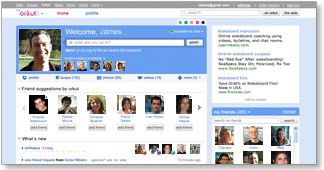
The orkut team has been working hard on building a new, fast and exciting experience. We've added lots of features and updated others - and we hope that existing and new users alike will enjoy this next generation of orkut. To start using the new orkut, check out the get started section. See you there!

Meantime, here's a look at the new orkut....


Faster & easier

Simpler and faster

Simpler and faster

Our team has worked closely with our pals at Google to create the fastest, easiest to use social network. It's all about speed: Now, you can browse photos, check out friend profiles, and view updates faster than ever. So you can enjoy your friends more, and spend less time waiting around for something to happen.

Homepage

Our users told us they wanted to see their favorite activities at the top of the front page. The result: Larger photos, easier to access notifications, faster navigation, and more updates closer to the top... these are just some of changes we've made to speed things up.

Other Google properties

Easy navigation to other Google properties

Visiting orkut but need to check your Gmail, or look up an address on Google Maps? Now its easy to stay logged in and visit any Google product by clicking on the small header at the top of any page.

Header bar

Notifications

One-stop notifications

No more skipping around to collect your friend requests, testimonials, community requests or birthday announcements! Now you can review all your requests and announcements in one place. The 'what's new' section of the homepage shows all your notifications - just click an item to show more info or take action. Notifications stay on that page until you take action, and you can see earlier notifications by clicking "older".

Photos

Fast photo uploads and photo sharing

Now you can select multiple photos and upload them 3x faster. And there's no more waiting as photos upload, so you can start reordering your images right away. Just drag and drop them as you want, rotate them, pick an album cover, or add captions.

You can also share the album with groups of friends with a single click, or by selecting faces to tag with your photos. Your friends don't need to be on orkut to see your photos, either - just enter their emails and they can see the images without signing up. Not sure who to share with? Orkut will suggest other folks who might want to see your photos. Photo sharing is a total snap with the new orkut.


Make it your own

Status

State your status!

"Ready for the weekend!!!" "Going to the game :)" "Touched down in New York ;)" - Tell your friends what you're up to by changing the status on your homepage. Your status is always visible to friends on your profile page, and gets posted to friends' updates immediately. With the new orkut, your pals can also comment on your status in the 'friends updates' section. Check and change your status whenever you want, and keep everyone in the loop.

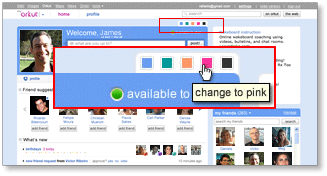
Colors

Pick your favorite colors

We've made orkut even more colorful by letting you customize your profile and homepage with your choice of 5 colors. Just pick a new color, and when your friends visit your profile, your page will have a whole new hue.

Changing colors

'About me'

It's all 'about me' with more customization

If you want to do more than just write about yourself, now you can add a YouTube video, a photo or even embed apps in the 'about me' section. Go to your profile and click on 'about me' to add, edit, and make it truly your own.


Friendlier friending

Finding friends

Find and invite friends - fast!

Finding friends is one of the most important activities on orkut! That's why we've made our "find friends" feature smarter and easier to use. When orkut finds someone you may know, you'll see a suggestion to connect right on your homepage.

And if there's a close friend who's not on orkut yet, we'll help you get them on orkut fast, too. Just select "add as friend" (or "invite" for non-orkut users) and send a quick message to invite them to join you on orkut. Once they accept your invitation, they'll be added to your friends list so you can start sharing your world through orkut.

Friends' updates

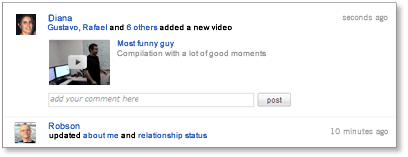
Cool new friends' updates on your homepage

Tired of just reading updates from friends? Now with inline comments for status messages, photos and videos, plus easy to use inline video play, your friends' updates make it easy to interact with your friends, not just read their static postings.

Comments box

Start typing anywhere you see a comment box, then click "post" and your comment will be added to your friend's latest update. Any photo comment you leave in updates will also show up on the actual photo page.

Inline video comments

Want to watch a video right away? Great! Just click on the video and it will expand and play directly in the updates section. Love the video so much you want to add it to your favorites? Select the option to add to your favorites and it will show up in your own 'videos' section.

Friends list

More dynamic friends list

Want to find a friend quickly? Your 'my friends' section now lets you scroll through all of your friends directly from homepage. Or just start typing a friend's name in the friends search box, and you'll see only those friends with names that match what you typed. Also, if you have your friends organized in different groups, you can use the pull-down menu next to 'my friends' to filter for different groups of friends.

Activity updates

Latest activity updates on friends profiles

Updated streams on your friends profile pages tell you what they've been doing lately - including photo and video uploads, apps activities, new friends added and more. It's the next best thing to being there in person!


Connect in new ways

Scraps

Post a scrap to say "hello"

Want to say a quick "what's up" to a friend? The 'scrap' feature lets you post directly to their profile pages. It's never been easier to drop by and leave a message.

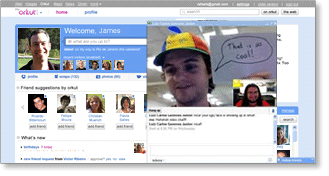
Video chat

Video chat

Face-to-face just got a lot easier, thanks to orkut's new video chat feature. Simply start a chat with a friend the old-fashioned way, then click "actions" on the chat window. You can choose between audio, video or group chat.

IM options

Orkut Promote

Promote stuff through your friends

'Orkut Promote' is a cool new feature that lets you create online flyers you can share with your friends. Want to sell your old skateboard? Spreading the word about a new video? Just create a promotion and have your friends to forward your items onto their friends. Promote encourages content sharing from friend to friend, and group to group. You can even track how many people have seen your promotions by visiting the metrics tab.